Budget Pulse Kit · $19 · Personal money
Set up your month with Claude, then keep it honest week by week.
A personal money check-in you install in your own Claude account. Claude walks you through setting up your household month from your own numbers, checks each update you give it, and sums up the month at the end. No bank connection. Nothing updates on its own.
Your download link arrives by email within one business day.
Version 2.2, updated Sun Oct 25, 2026. Adds charts: a meter on every spending group, a bridge from cash on the 1st to the month-end figure, and a month timeline that names the lowest point. Bills can be yearly or one-time and marked due, paid or cleared; cards carry a limit. Earlier versions.
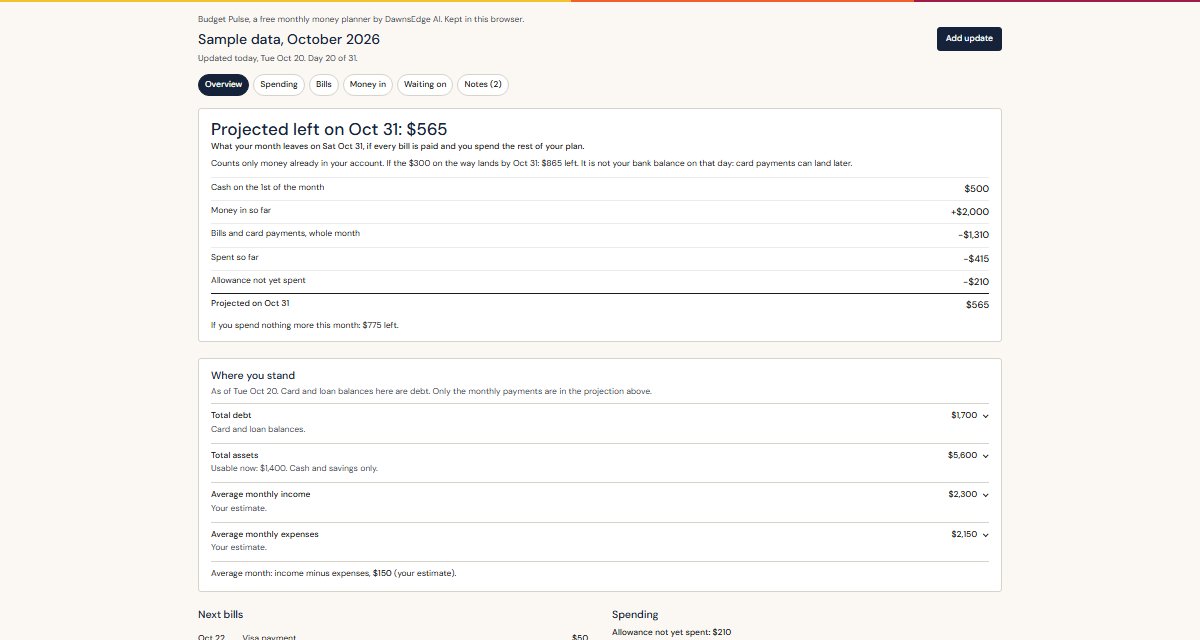
The top of the tracker, with made-up numbers. Tap it for the whole page.
What you receive
- Instructions for your Claude (claude-project-instructions.md). You paste them once.
- The tracker template (budget-pulse-template.html). Add it to the Project. You do not edit it; Claude uses it to build your tracker.
- The hand-fill page (budget-pulse.html). The same tracker, for typing in yourself.
- The setup guide (README.md). The five-minute install and the weekly routine.
What you need
- A Claude account at claude.ai that can create a Project.
- Your own numbers: money in, bills, cards and loans, and roughly what you spend. Last month's statement helps.
- About 15 minutes the first time, then a few minutes a week.
What you do after buying
- Download and unzip. Open README first.
- Install, about five minutes. Make a Project called Budget Pulse, paste the instructions, add the template file.
- Set up the month, about ten minutes. Type "Set up my month." Claude asks for your numbers and shows your tracker.
- Each week, type "update my month." Tell Claude your updated totals, or give it a transaction list with account numbers, card numbers and other identifying details removed. It checks the totals and shows the new tracker. At the end of each chat, save the month file Claude gives you into the Project, so the next chat picks up where you left off. At month end, ask for the summary.
Free page or the kit?
The free page is the tracker you type into yourself, in your browser. The kit adds Claude: it asks the setup questions, sorts and checks what you give it each week, and sums up the month. The kit includes the free page too.
Prefer to type everything yourself? Open the free page.
Price, delivery, support, refund
- $19, one time, by card through Stripe.
- The download link is emailed to you within one business day.
- Email kim@dawnsedgeai.com if the install does not work. I answer within three business days. No ongoing support.
- Refund within 7 days if the install does not work for you.
What it is not
- Not connected to your bank. Claude sees only what you paste or connect in your own account.
- Not financial advice. It works with your numbers and says what they add up to.
- Not a service. I do not enter your numbers, watch your accounts, or keep the tracker current. You do the updates.
- Where your information lives: in your Claude Project and in the month file you save. The free page keeps its data in your browser until you save it to a file. Leave out account numbers, card numbers and full names.
Versions, newest first
Already bought it? Your download link always holds the current version: open it again, replace the three files in your Project, keep your month file. The guide inside has the three steps. Every version opens the month files saved by the ones before it.
- 2.2, Sun Oct 25, 2026. Charts: spending meters, the cash bridge, the month timeline with the lowest point named. Yearly and one-time bills; due, paid or cleared on every bill; card limits with a near-limit warning; a date on money on the way.
- 2.1.1, Fri Oct 23, 2026. Save-your-month as its own step; Claude checks the month file's date before it calculates.
- 2.1, Tue Oct 20, 2026. "Not added yet" instead of $0 for anything missing; savings groups; "Where you stand" and "Waiting on" views.
- 2.0, Tue Oct 20, 2026. The main number became a month-end projection with its conditions stated; overview plus views.
- 1.0, Sat Oct 10, 2026. First kit.
Kim Siler, DawnsEdge AI LLC · kim@dawnsedgeai.com